
How to tag trades: a small system of setup, emotion, rating and tags
A tag is a question you plan to ask later. A starter tag system for MT5 traders, naming rules that keep searches working and how to review your tags after fifty trades.
A tag is a question you plan to ask later
Tagging a trade feels like admin until the day you want to know something about your trading and the answer is sitting in a column you filled in months ago. Which setup do I lose money on? Do I trade worse when I am rushed? Are my news trades worth the stress? Every one of those questions is answered by a label you put on a trade at the time. So the way to design your tags is backwards: start from the questions you want answered, and add only the labels that answer them.
This guide shows a small tagging system that works for MetaTrader 5 traders, how to name things so a search finds them, and how to review the tags after your first fifty trades. The Journal page in AI Trading Journal has the fields for it, and the same system works in a spreadsheet or a Notion table.
Fields and tags are different tools
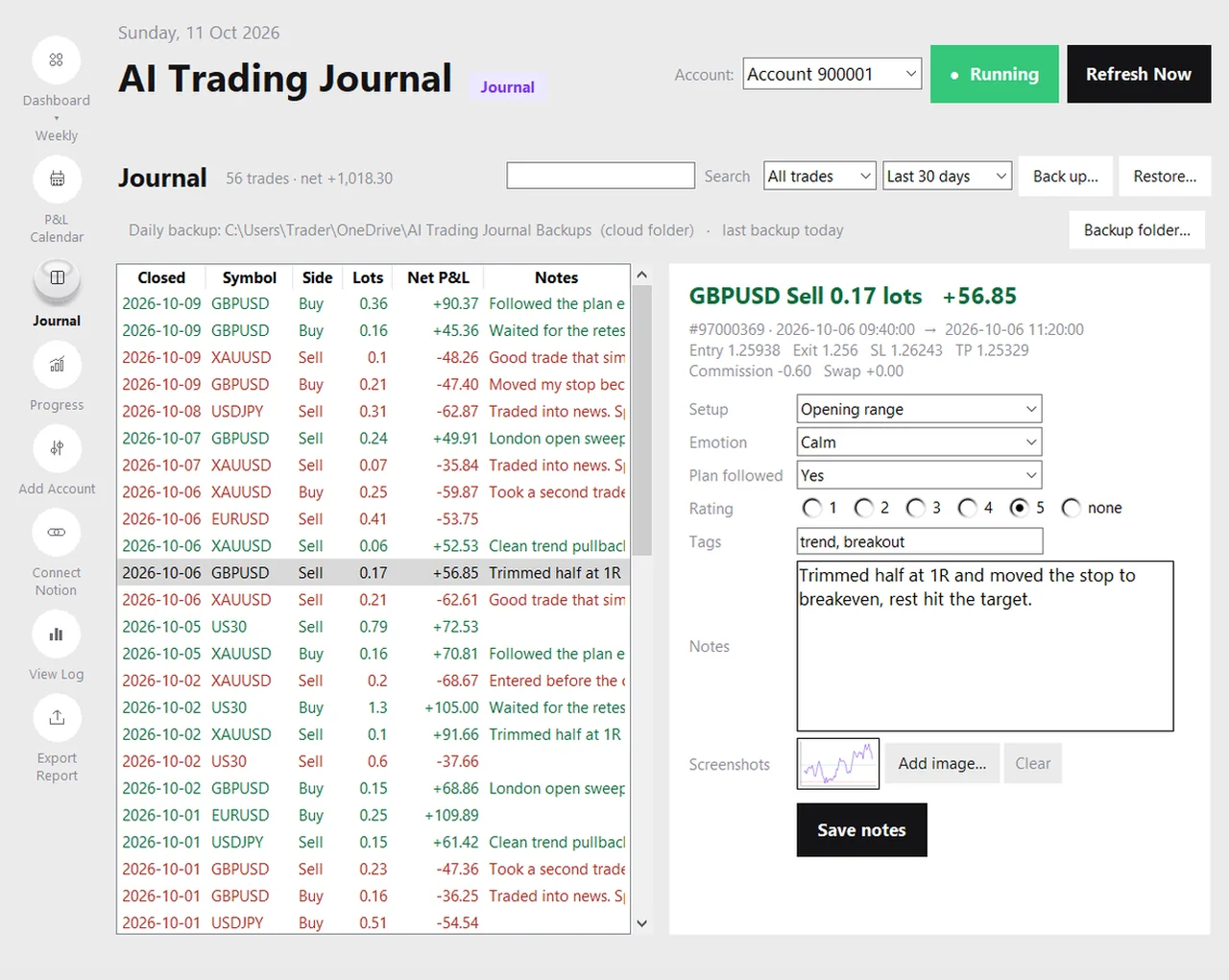
It helps to separate things that have one answer from things that have many. The Journal page has four fixed fields, each with a single answer per trade, and one free tag list for everything else.
| Where | One or many per trade? | Use it for |
|---|---|---|
| Setup | One | The name of the pattern or plan you traded, written the same way every time |
| Emotion | One | The dominant state when you entered: calm, confident, anxious, impatient, FOMO, frustrated |
| Plan followed | One | Yes, partly or no |
| Rating | One | One to five stars for execution, not for the result |
| Tags | Many | Context labels such as session, news, trend or a mistake you made |
The notes and screenshots guide explains how to fill the fields in a two-minute routine. This page is about the tag list and the thinking behind all five.
Five rules for tags that stay useful
- Few and stable. Ten tags you use every time beat fifty you use once. A new tag should replace a question, not add a hobby.
- One word, lower case. Use london, not London Session Open. Short words are easy to type and easy to search. Use a hyphen when you need two: news-fade.
- Describe what happened, not what you think of it. moved-stop is a fact. stupid is a mood, and it will change.
- Group before you name. Decide the groups first (when, where, what went wrong) and give every tag a home. A tag with no group is usually a duplicate of one that has.
- Never rename in the middle. If you change BO to breakout halfway through, a search finds only half of your trades. Decide the name, write it down, keep it.
A starter set of tag groups
| Group | Example tags | The question it answers |
|---|---|---|
| When | asia, london, newyork, overlap | Which session do I trade best, and worst? |
| Market state | trend, range, news, thin | In which conditions does my setup work? |
| Trade type | scalp, swing, add-on, hedge | Which kinds of trade pay for their effort? |
| Execution | early-entry, late-entry, moved-stop, no-stop, oversize | What do my mistakes have in common, and what do they cost? |
| Quality | a-plus, marginal | Do my best setups really do better than my marginal ones? |
Start with just two or three of these groups. Setup, emotion and rating are already covered by the fields, so many traders only need one tag group for execution mistakes and one for the session. Add the rest after you have fifty trades and know what you want to learn.
Define the rating before you use it
A star rating is only useful if every star means the same thing every time. Write your scale down once and keep it next to the screen:
| Stars | Meaning (execution, not result) |
|---|---|
| 5 | Followed the plan exactly: entry where planned, size as intended, stop not touched |
| 4 | Followed the plan, with a small deviation that did not change the risk |
| 3 | Plan roughly followed, but a decision I would not repeat |
| 2 | A clear plan break, such as an early entry or a moved stop |
| 1 | No plan, or a trade taken because of an emotion |
A one-star trade that made money is still a one-star trade. That is the whole idea: the rating separates the quality of the decision from the luck of the outcome. Over time, your five-star trades and your one-star trades tell you what your habits are worth.
Tag in the moment, with three clicks
- After the session, open the Journal page and pick the first trade that closed.
- Set the setup, the emotion and the plan-followed answer. Ten seconds.
- Add the rating and at most two tags. If you need more than two, you are describing a story, and the story belongs in the notes box.
- Move to the next trade. Your entry is saved when you pick another trade or press Save, and a sync never overwrites it.
The longer you wait, the more your memory rewrites the trade. Tags added a week later describe what you now think happened, which is exactly the bias a journal exists to remove.
Reviewing the tags after fifty trades
Wait until you have around fifty tagged trades before you draw anything from them. Below that, a single unusual trade can make a tag look better or worse than it is. At fifty or more, filter and compare. The search box on the Journal page matches the setup, emotion, tags, notes and symbol, and the filters limit the list to wins or losses and to a period. Here is what a review table might look like, with hypothetical numbers:
| Tag or field | Trades | Net result | What to ask |
|---|---|---|---|
| Plan followed: yes | 34 | +$210 | This is the baseline. Is it positive after costs? |
| Plan followed: no | 16 | -$185 | What did breaking the plan cost, and when did it happen? |
| early-entry | 9 | -$96 | A repeatable mistake. What rule would prevent it? |
| london | 21 | +$150 | Is the edge in the session, or in the setup I trade then? |
| news | 7 | -$80 | Small sample. Keep tagging before deciding. |
These figures are invented to show the shape of a review, not to suggest what any trader should find. The point is the habit: let your own tags tell you where the money and the mistakes are, and change one thing at a time. The trading psychology journal guide goes further on the emotion side, and the revenge trading guide and the overtrading guide show two specific patterns to look for.
Common tagging mistakes
- Tagging only the losers. You then learn what your losers share, but not whether your winners share it too.
- Too many tags. If you hesitate over which one to pick, you will stop tagging within a week.
- Tagging by outcome. A tag such as good-trade added because the trade won only records the result you already know.
- Drawing conclusions from five trades. Small samples flatter and mislead in equal measure.
- Never looking. A tag you never filter on is a chore. Put a monthly review in your calendar.
Take the tags with you
Export Report adds your setup, emotion, plan followed, rating and tags as columns on the Trades sheet of the Excel workbook, so you can build a pivot table of results by tag. The daily backup includes them, and if you connect Notion they are copied to the trade’s own page. See the Excel report guide, the backup guide and the optional Notion guide. If you are not sure what to write in the notes box next to your tags, trading journal questions has prompts.
A useful tag to start with is the event: for example news: FOMC or news: NFP. See how to journal FOMC days and NFP days.
Frequently asked questions
How many tags should I use?
What is the difference between a tag and the emotion field?
Should I rate a winning trade five stars?
Can I search by tag?
Do tags appear in the Excel report?
Related guides
- A local trading journal for MT5
- P&L calendar for MT5
- Trade notes, ratings and screenshots
- Trading progress and goals
- Back up your journal and move it to a new PC
- An offline trading journal for Windows
- How to set monthly trading goals
- Import your whole MT5 history
- Trade screenshots for your journal
- An MT5 trading journal with no subscription
- All trading journal comparisons
Start tagging free for 7 days
Free for 7 days, no card required. After that, a one-time $19.99 purchase. No subscription. Also on the Microsoft Store.
One-time $19.99, no monthly fee · your MT5 login never leaves your PC · trades go into your own journal on your PC, not through our servers.
Start free 7-day trial