
Trade notes, ratings and screenshots: the half of the journal only you can write
MetaTrader 5 records what happened. The Journal page records why. How to use each field, a two-minute routine and how to review your notes for patterns.
The numbers are the easy half
MetaTrader 5 already records what happened: the entry, the exit, the size and the result. A journal becomes valuable when it also records what you were thinking, and almost nobody does that without a reason and a place to do it. The Journal page of AI Trading Journal is that place. Every closed trade has a small form next to it, so the habit costs a minute instead of a spreadsheet session.
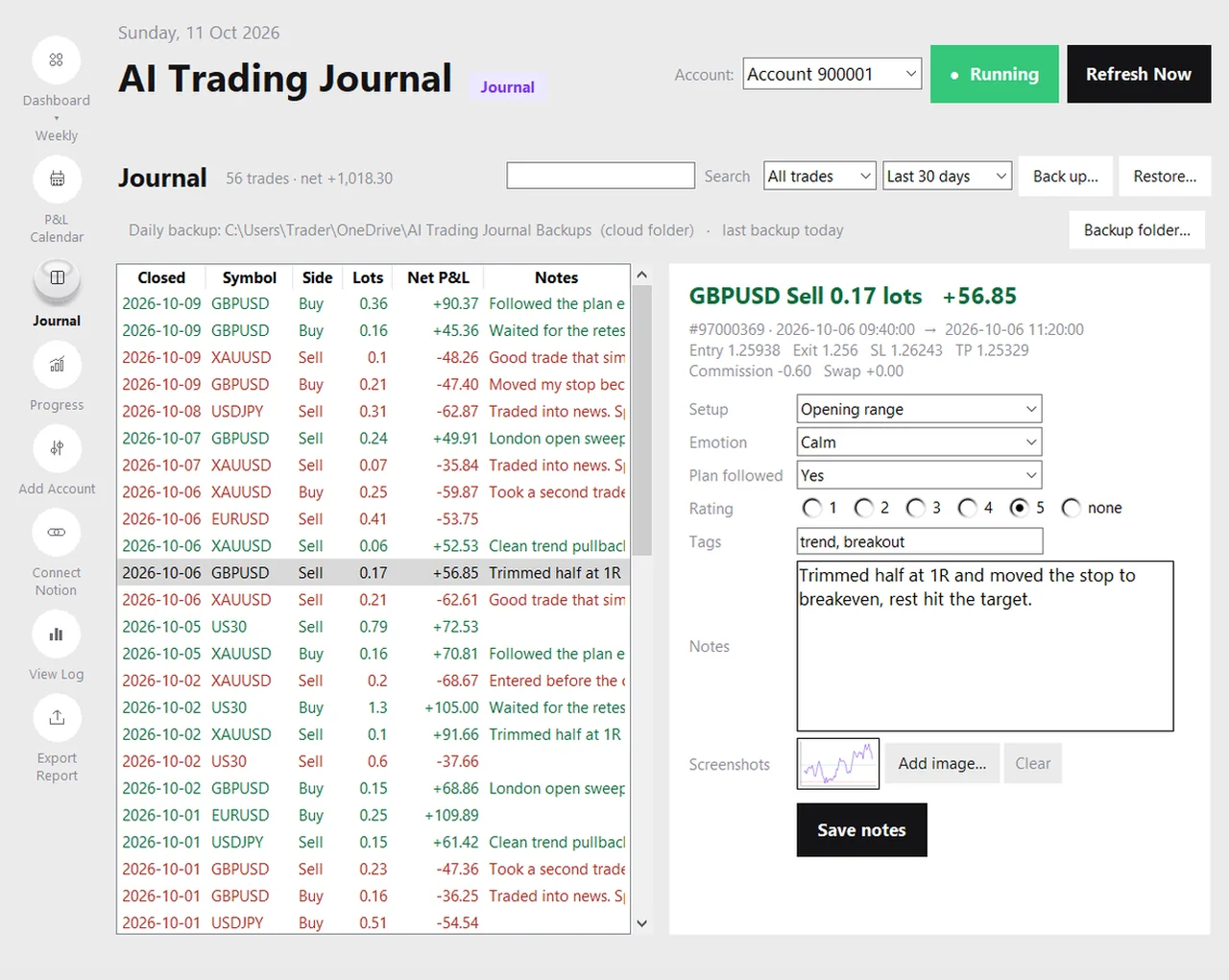
The fields, and what each one is for
| Field | What to put in it | The question it answers later |
|---|---|---|
| Setup | The name you give this kind of trade, written the same way every time, such as London breakout or Trend pullback | Which setups actually pay, and which only feel good? |
| Emotion | One word for the state you were in when you entered: calm, confident, anxious, impatient, FOMO, frustrated | Do I trade worse when I am rushed, angry or bored? |
| Plan followed | Yes, partly or no | What do my rule-breaking trades cost me? |
| Rating | One to five: how well you executed, not whether it won | Do my best-executed trades win more over time? |
| Tags | Short labels such as news, london, a-plus, scalp | What do my worst trades have in common? |
| Notes | Two or three sentences: why now, what happened, one thing to remember | What did I think at the time, before the story changed? |
| Screenshots | The chart at entry, or at exit, or both | What did the market actually look like? |
The setup box remembers what you have typed before and offers it again, which makes consistent wording easy. Consistency matters more than the words themselves: if one note says “breakout” and another says “BO”, a search will miss half of them.
Rate execution, not results
The rating is the most useful field if you use it honestly and the most misleading if you do not. Give a trade five stars when you followed your plan, took the entry where you meant to and sized it as intended, even if it lost. Give it one star when you broke your rules, even if it made money. After a few months, filter the list to your five-star trades and compare their results with your one-star trades. If good execution pays and bad execution costs, you have found the habit worth protecting. The trading psychology journal guide goes further on the emotion side.
A two-minute routine after each session
- Open the Journal page and look at the trades that closed today. Pick the first one.
- Choose the setup, the emotion and the plan-followed answer. These three clicks take ten seconds.
- Set the rating, add one tag if it helps, and write two lines in the notes box. Say why you took it and what you would do differently.
- If the chart told the story, press Add image and attach a screenshot. The app copies it next to your journal, so the original can move.
- Move to the next trade. Your note is saved when you pick another trade or press Save, and a background sync never overwrites it.
Finding things later
The list has a search box and two filters. Search matches the ticket number, the symbol, your notes, your tags, the setup and the emotion, so typing “FOMO” or “news” finds every trade you labelled that way. One filter shows all trades, only wins or only losses. The other limits the range: the last 30 days, the last 7 days, today, this month or all time. A good first review is to filter to losses over the last 30 days and read the notes of every one. Patterns usually appear within ten trades.
A worked example, with hypothetical entries
| Setup | Emotion | Plan | Rating | Result | Note |
|---|---|---|---|---|---|
| London breakout | Calm | Yes | 5 | +$62 | Waited for the retest. Stop under the swing low. |
| London breakout | Impatient | No | 2 | -$48 | Entered before the candle closed. Setup was fine, entry was early. |
| Trend pullback | Confident | Yes | 4 | +$71 | Trimmed half at 1R and moved the stop to breakeven. |
| News fade | Anxious | Partly | 2 | -$55 | Traded into the release. Spread widened and I got stopped out. |
These four invented rows already show something: both losses had an emotion other than calm and a plan-followed answer other than yes. A real journal needs more trades than this before you believe a pattern, but this is exactly the kind of pattern it exists to find.
Your notes travel with you
- In Excel. Export Report adds your setup, emotion, plan followed, rating, tags and notes as columns on the Trades sheet, so you can filter and pivot them in a spreadsheet. See the Excel report guide.
- In backups. The daily backup and the Back up button save one .zip with your notes, ratings, goals and every screenshot. See backups.
- In Notion, if you connect it. Notes and screenshots you write in the app are copied to the trade's own Notion page, in your existing columns, and notes you already wrote in Notion are imported once. See the optional Notion guide.
What this page does not do
- It does not write notes for you or judge your trades. The words are yours.
- There is no bulk editing or strategy manager. Each trade is edited on its own.
- Screenshots are plain images you attach. There is no price-chart replay.
- Images sent to Notion are limited to 5 MB each.
The guide to what a useful MT5 journal records explains why these fields were chosen, and trading journal questions has prompts for the notes box when you do not know what to write.
Frequently asked questions
Will a sync overwrite my notes?
Where are my screenshots stored?
Can I search my notes?
Do my notes appear in the Excel report?
Related guides
- A local trading journal for MT5
- P&L calendar for MT5
- Trading progress and goals
- Back up your journal and move it to a new PC
- An offline trading journal for Windows
- How to set monthly trading goals
- Import your whole MT5 history
- How to tag trades
- Trade screenshots for your journal
- An MT5 trading journal with no subscription
- All trading journal comparisons
Start your notes today: free for 7 days
Free for 7 days, no card required. After that, a one-time $19.99 purchase. No subscription. Also on the Microsoft Store.
One-time $19.99, no monthly fee · your MT5 login never leaves your PC · trades go into your own journal on your PC, not through our servers.
Start free 7-day trial