
How to set monthly trading goals: a loss limit first, then a target
Choose the most you will lose before you choose what you want to make. A step-by-step way to set both numbers from your own risk, plus the rules and review that make them work.
Why a monthly goal at all
A day is too noisy to judge and a year is too far away to steer by. A month is long enough to contain a meaningful number of trades and short enough that a bad stretch can still be corrected. That makes it the natural unit for two numbers every trader should write down before the month begins: the most you are willing to lose, and the result you are aiming for. Writing them down matters more than the exact values, because the act of choosing them in advance is what keeps a bad Tuesday from turning into a bad month.
This guide shows one way to choose both numbers from your own risk per trade, how to turn them into rules you can follow, and how to review the month afterwards. It is general education about record keeping and risk, not advice about what you should earn or how you should trade.
Set the loss limit first
Most advice on this topic agrees on the order: decide how much you can lose before you decide how much you want to make. The reason is practical. A loss limit is something you can control, because it follows from the size of your trades. A profit target is something the market decides. Starting with the limit protects the account and keeps the target honest.
One simple way to find the limit is to count losses instead of dollars. Choose how many full-risk losing trades you are willing to take in a month, and multiply by your risk per trade.
| Step | Hypothetical example | How to get your own number |
|---|---|---|
| Account size | $10,000 | Your balance at the start of the month |
| Risk per trade | 0.5% = $50 | Your own rule. The position size calculator turns it into lots |
| Full-risk losses you will accept in a month | 8 | Look at your longest losing streaks in the journal and add a margin |
| Monthly loss limit | 8 x $50 = $400 (4%) | Losses accepted x risk per trade |
These numbers are invented to show the arithmetic. Your own risk per trade, trade count and streaks decide yours. If you want to see how a losing streak interacts with your risk, the losing streak calculator and the risk of ruin calculator use the same inputs.
Then choose a target you can reason about
A target pulled from the air is the most common mistake: a round figure that feels good and has no connection to how you trade. A target you can reason about comes from your own history. Take the number of trades you normally take in a month, and your average result per trade in R multiples, which is your result divided by what you risked. The product is a rough, and deliberately modest, picture of a normal month.
| Input | Hypothetical example |
|---|---|
| Trades in a normal month | 40 |
| Average result per trade, from the journal | +0.2R |
| Expected month in R | 40 x 0.2 = +8R |
| In money at $50 risk | 8 x $50 = +$400 |
| Target as a range | +$200 to +$400 |
Notice what is missing: any promise. The average result in the example is invented, and real averages move around from month to month. That is why the last row is a range and why the number should come from your own expectancy and not from the example. If your journal does not yet hold enough trades to know your average, set the target at zero or leave it blank and set only the limit until it does.
Prefer a range, and add a process goal
A single target you feel you must hit on the last Friday is a risk in itself, because it tempts you to force trades or to size up. A range removes that pressure: you are content anywhere inside it, and happy to stop early if you are already there. Alongside the money goals, add one goal about behaviour that you can fully control, such as following your plan on every trade or taking no more than a set number of trades a day. These are the goals the trading discipline rules guide shows how to score, and they are the ones that usually predict the money goals.
Turn the numbers into rules
- If the month hits the loss limit, stop for the month. Use the rest of it to review, not to win it back. Decide this now, while you are calm.
- Split the limit into smaller ones. A monthly limit of $400 over about 20 trading days is a rough $20 a day on average, but a daily limit of one or two full-risk losses is easier to follow.
- Write down what you do at half the limit. For example, cut size in half. A pre-agreed step at 50 per cent keeps the limit from arriving as a shock.
- Do not move the limit during the month. Changing it after a loss defeats its purpose. Changes belong in the review.
- Check the rules of any prop firm separately. A funded account has its own daily and maximum loss rules set by the firm. Your personal limit should sit inside them, never replace them. The prop firm drawdown calculator works with those rules.
Tracking the goals in AI Trading Journal
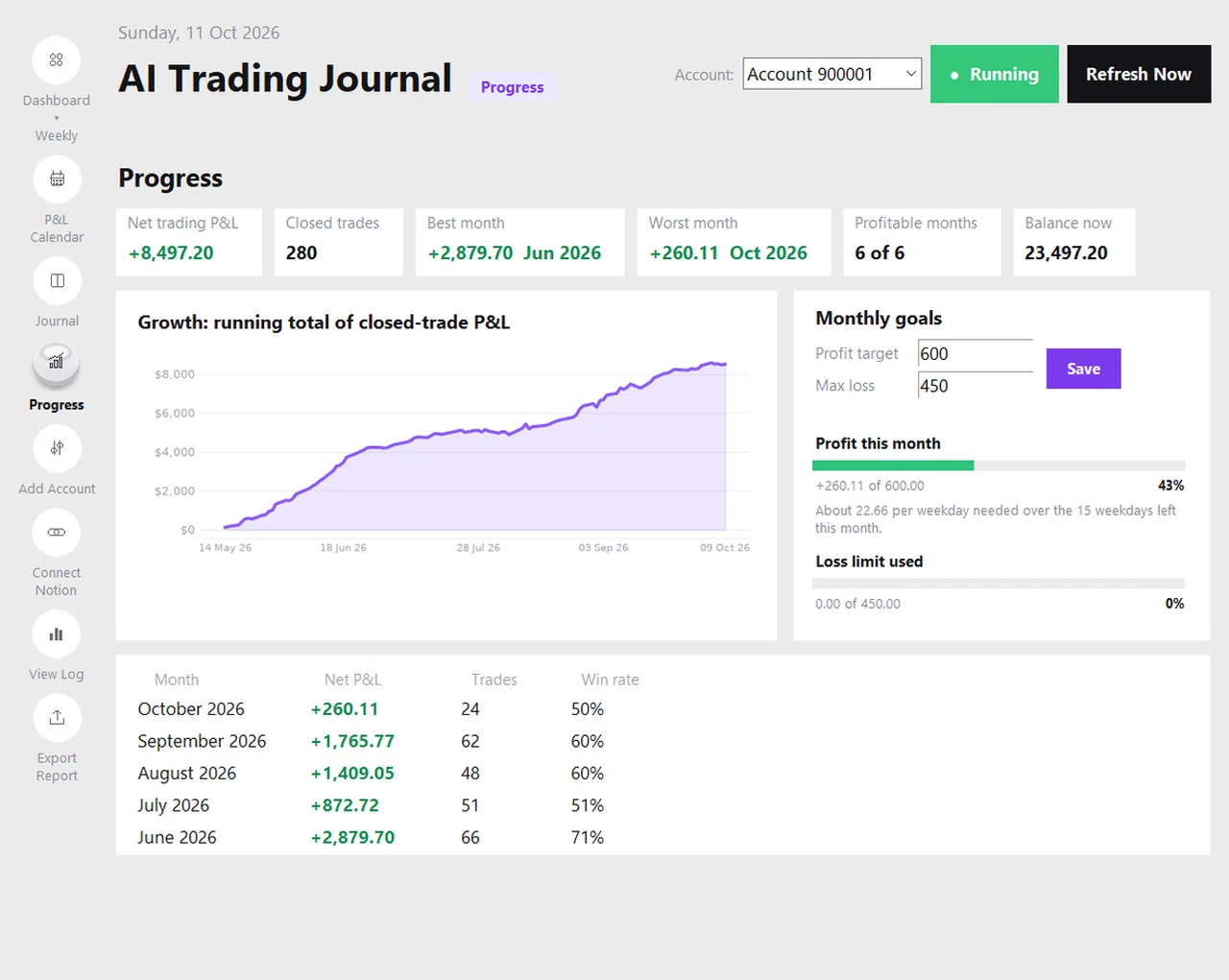
The Progress page has two boxes for the current month: a profit target and a maximum loss. Type them in and press Save. The first bar shows how much of the target you have reached so far, as a figure and a percentage, and a hint divides what is still missing by the number of weekdays left in the month. The second bar fills only when the month is negative and shows how much of your allowed loss you have used. The goals are stored inside your journal on your PC, one set per account, so they are part of every backup. The page does not send alerts or stop you from trading. It is a mirror, and the rule stays yours. The page is described in more detail in trading progress and goals.
A ten-minute month-end review
| Question | Where to look |
|---|---|
| Did I stay inside the loss limit? | The loss bar on the Progress page |
| Did I land inside my target range? | The profit bar, and the months table |
| Did I follow my plan? | Journal page, filter by plan followed |
| Which days drove the result? | The P&L calendar |
| Is my average result per trade still what I assumed? | Dashboard on the Monthly period, then update the target inputs |
| What will I change next month, if anything? | One written sentence. Not five. |
The monthly performance report guide shows how to turn the answers into a one-page record, and the weekly review checklist keeps the month from surprising you.
Common mistakes
- A target far above what your size can produce. It pushes you to risk more per trade or to take marginal setups.
- Counting deposits as profit. A deposit moves your balance, not your trading result. Use the net trading result.
- Ignoring costs. Commission and swap are part of the result. A goal measured before costs will always look easier than it is.
- Comparing months with different numbers of trades. A short month, or a month you traded less on purpose, is not directly comparable.
- Reading one month as a verdict. Twenty trading days is a small sample. Look for patterns that repeat across several months.
Frequently asked questions
Should I set the loss limit or the profit target first?
How do I pick a realistic monthly profit target?
Does AI Trading Journal stop me when I reach my loss limit?
Where are my goals stored?
Do prop firm rules replace my personal goals?
Related guides
- A local trading journal for MT5
- P&L calendar for MT5
- Trade notes, ratings and screenshots
- Trading progress and goals
- Back up your journal and move it to a new PC
- An offline trading journal for Windows
- Import your whole MT5 history
- How to tag trades
- Trade screenshots for your journal
- An MT5 trading journal with no subscription
- All trading journal comparisons
Track your goals free for 7 days
Free for 7 days, no card required. After that, a one-time $19.99 purchase. No subscription. Also on the Microsoft Store.
One-time $19.99, no monthly fee · your MT5 login never leaves your PC · trades go into your own journal on your PC, not through our servers.
Start free 7-day trial