
Trade log vs trading journal: the difference and how to keep both
A log records what happened. A journal adds why. What each one holds, why they work best together and how to stop retyping the numbers your platform already has.
The short answer
A trade log (also called a trading log) is the factual record of what happened: the date, the symbol, the direction, the size, the entry and exit prices and the result. A trading journal is the log plus the reasons: why you took the trade, what you expected, how you felt and what you would change. Most traders use the two words as if they meant the same thing, and in daily speech that is fine. The distinction matters when you decide what to keep, because the log is easy to automate and the journal is the part that only you can write.
| Trade log | Trading journal | |
|---|---|---|
| What it holds | The facts of every trade | The facts plus your reasoning and review |
| Where the data comes from | Your platform, automatically | The log, plus what you write |
| Example field | Entry 2350.00, exit 2362.50, +$125 | Setup: London breakout. Emotion: calm. Plan followed: yes |
| What it answers | What did I do, and what was the result? | Why did I do it, and what should I change? |
| Effort | Almost none if it is automatic | A couple of minutes per trade you want to learn from |
| Risk of keeping only this | Numbers without a story. You see the result and not the cause | A diary without data, hard to search and impossible to measure |
Why traders keep the log and the journal together
Each half is weak without the other. A log on its own tells you that Tuesday lost money, but not that you took six trades in an hour after the first loss. A journal on its own is a set of stories, and stories drift: you remember the setups that worked and forget the ones that did not. When the two live in the same record, every note is attached to a real trade and every number can be explained. That is the idea behind a trading journal that fills its own log: the facts are there automatically, and your effort goes into the notes.
What a good trade log contains
- Identity: a trade number or the broker’s ticket, so a trade can be found again.
- Time: the date and time it opened and closed. On MetaTrader 5 both follow the broker’s server clock, which can be several hours ahead of yours.
- Instrument and side: the symbol and whether you bought or sold.
- Size: the lot size or volume.
- Prices: entry, exit, and the stop loss and take profit that were set.
- Result: the net profit or loss, which should include commission and swap, because those are part of what the trade cost you.
Everything above is already stored by MetaTrader 5 for every position. A log is therefore never a data-entry problem if you read it from the terminal. It becomes one only if you retype it.
What a trading journal adds
| Field | Question it answers later |
|---|---|
| Setup | Which setups pay, and which only feel good? |
| Emotion | Do I trade worse when I am rushed, angry or bored? |
| Plan followed | What do my rule-breaking trades cost me? |
| Rating (execution, not result) | Do my best-executed trades win more over time? |
| Tags | What do my worst trades have in common? |
| Notes and screenshots | What did I think and see at the time, before the story changed? |
The notes and screenshots guide explains how to fill these in a two-minute routine, and the tagging guide shows a small system for the labels.
How the two fit in AI Trading Journal
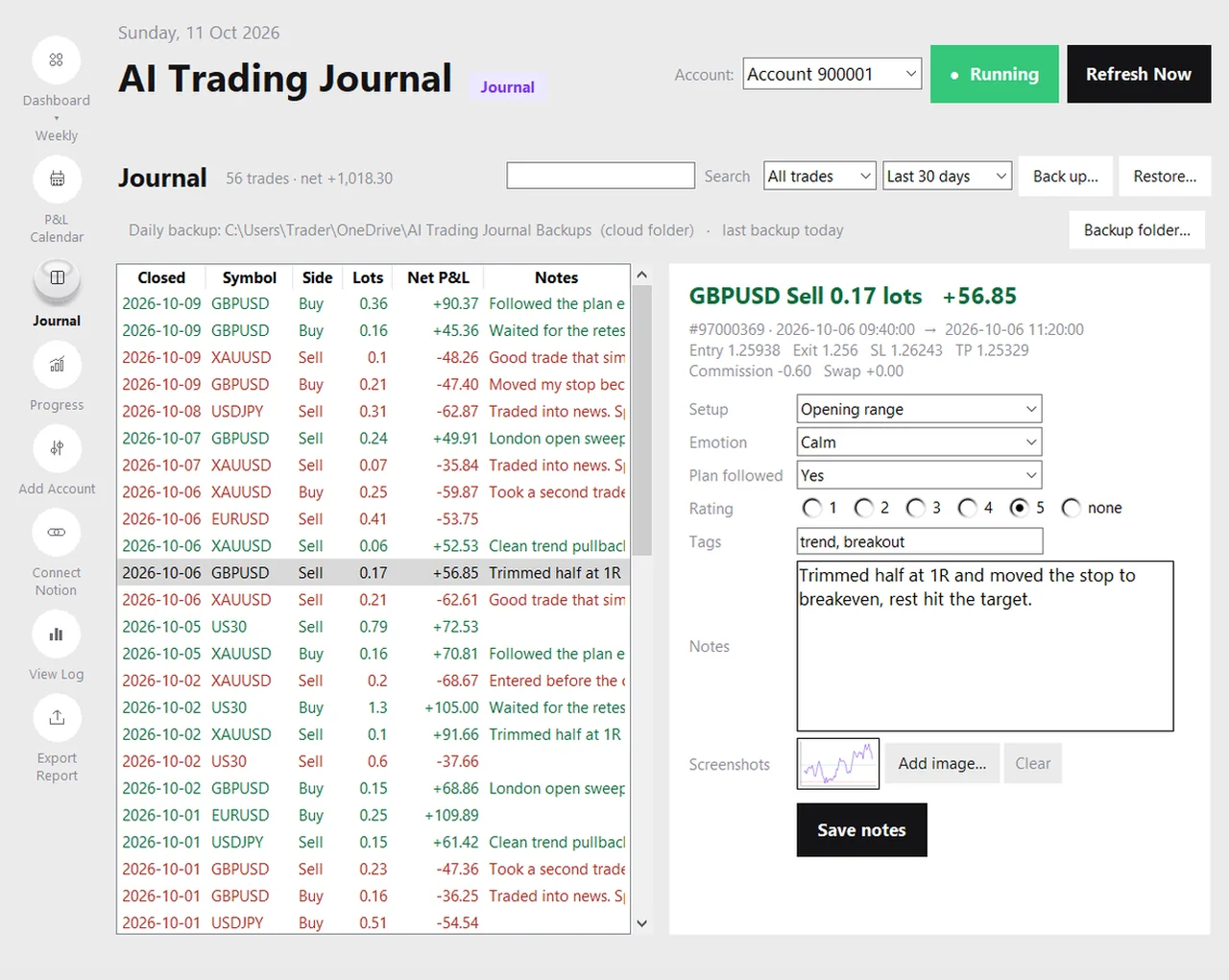
AI Trading Journal keeps both in one file on your own PC. The log half writes itself: it reads your closed positions from MetaTrader 5 about every five minutes and saves one entry for each, with the open and close time, the prices, the stop and take profit, and the net result of profit plus commission plus swap. A position closed in several parts is one entry. The first run reads your account’s whole history, so the log is complete from your first trade and not from the day you installed.
The journal half sits on the same row. The Journal page lists the log and lets you add a setup, an emotion, a plan-followed answer, a rating, tags, notes and screenshots to any trade. A sync only updates the figures and never overwrites what you wrote. From the same data it builds a dashboard, a P&L calendar and an Excel report. You can read more in the local journal guide.
A trade log entry and a journal entry, side by side (hypothetical)
| Log (automatic) | Journal (yours) |
|---|---|
| XAUUSD, buy, 0.10 lots | Setup: London breakout. Emotion: calm |
| Opened 09:42, closed 11:15 (server time) | Plan followed: yes. Rating: 5 |
| Entry 2350.00, stop 2345.00, exit 2362.50 | Note: waited for the retest, stop under the swing low |
| Net +$125.00 after commission and swap | Tag: london, a-plus. Screenshot attached |
The figures are invented. The log tells you what happened. The journal tells you that it happened because you waited for the retest, which is the part you would like to repeat.
Do you need both?
- You only need a log if you want totals: how much you made, your win rate and your drawdown. Your broker statement already is one.
- You need a journal if you want to improve. Improvement comes from the reasons, not from the totals.
- You need them together as soon as you have more than a few dozen trades, because that is when memory stops being reliable and patterns start to be worth finding.
If you want to start with a spreadsheet, the trade log template gives you the columns and the formulas. If you would rather not type, the comparison of automatic tracking methods shows the four ways to fill the log for you.
Mistakes to avoid
- Keeping a log and calling it a journal. Numbers alone do not teach.
- Keeping a diary without data. If you cannot filter your notes by result, you cannot learn from them.
- Typing what the platform already knows. It is slow, it has typos and it is the main reason journals are abandoned.
- Reviewing only the losses. Winners teach you what to repeat, and they can hide broken rules.
Frequently asked questions
What is the difference between a trade log and a trading journal?
Is a trading log the same as a trade log?
Can a trade log be automatic?
Do I need both a log and a journal?
Does AI Trading Journal keep a trade log?
Related guides
- A local trading journal for MT5
- P&L calendar for MT5
- Trade notes, ratings and screenshots
- Trading progress and goals
- Back up your journal and move it to a new PC
- An offline trading journal for Windows
- How to set monthly trading goals
- Import your whole MT5 history
- How to tag trades
- Trade screenshots for your journal
- All trading journal comparisons
Keep your log and journal together: free for 7 days
Free for 7 days, no card required. After that, a one-time $19.99 purchase. No subscription. Also on the Microsoft Store.
One-time $19.99, no monthly fee · your MT5 login never leaves your PC · trades go into your own journal on your PC, not through our servers.
Start free 7-day trial