
A day trading journal for MT5: record every trade without typing
Day traders take too many trades to write about each one. What to record, a short daily routine and the numbers to watch, for forex, gold and indices on MetaTrader 5.
What a day trader needs from a journal
A day trader opens and closes positions within the same session and often does it many times a day. That changes what a journal has to do. There are too many trades to describe in writing, the costs of each one matter, and the biggest risks are behavioural: trading too often, trading after a loss and trading outside your best hours. A day trading journal therefore has to do two jobs. It has to capture the numbers automatically, and it has to give you a quick way to mark the trades that deserve a closer look.
This guide covers day trading on MetaTrader 5, forex, gold, indices and other CFDs, and shows what to record, what to review daily and weekly and how to keep the record without typing.
What to record for each trade
| Field | Why it matters to a day trader |
|---|---|
| Open and close time | To find your best and worst hours and measure how long you hold |
| Symbol and direction | To see which instruments and which side you trade best |
| Size | To spot size creeping up after a loss |
| Entry, exit, stop, target | To compare the plan with the result |
| Net result | Profit plus commission plus swap. Costs matter when you trade often |
| Setup | A short, consistent name, so setups can be compared |
| Plan followed | The most useful single field. A yes or no |
| Emotion and notes | For the trades you want to study |
Forex traders think in pips, index and gold traders in points or dollars. Choose one unit for each instrument and stay with it, or record the money result only, which is comparable across all of them. The money result and the R multiple, which divides the result by what you risked, are the two numbers that always compare. The R multiple calculator works it out.
A daily routine that fits a trading day
| When | What to do | Time |
|---|---|---|
| Before the session | Read yesterday’s one-line lesson. Write today’s focus rule | 2 minutes |
| During the session | Trade. Do not write notes between trades | None |
| After the session | Check the trade count and the result. Mark the plan-followed answer for each trade | 3 minutes |
| After the session | Pick the worst-executed trade and write two lines on it | 2 minutes |
| Friday | Review the week on the calendar and the dashboard. Choose one change | 15 minutes |
The end-of-day review template gives you the questions, and the weekly review checklist covers Friday.
The numbers a day trader should watch
- Trades per day. Many day traders find their worst days are their busiest. Put a cap in your rules and check it against the calendar.
- Net result after costs. Not gross. The breakeven win rate calculator shows how much costs raise the win rate you need.
- Results by hour and weekday. The best-time guide shows how to find your own.
- Largest loss against average loss. A single oversized loss can erase a week.
- Results after a loss. Compare the trade that follows a loss with the trade that follows a win. Revenge trades live here. See the revenge trading guide.
How to keep the record without typing
AI Trading Journal reads your closed positions from MetaTrader 5 every five minutes and saves them in a journal on your PC. Every trade appears with its open and close time, prices, stop and take profit and net result, including the first run’s whole account history. A position closed in parts is one entry, and trades are dated on the broker’s server clock, the same as the History tab. The dashboard has Daily, Weekly, Monthly and All-time periods, so a day or a week is one click. The calendar shows the result and the trade count for every day.
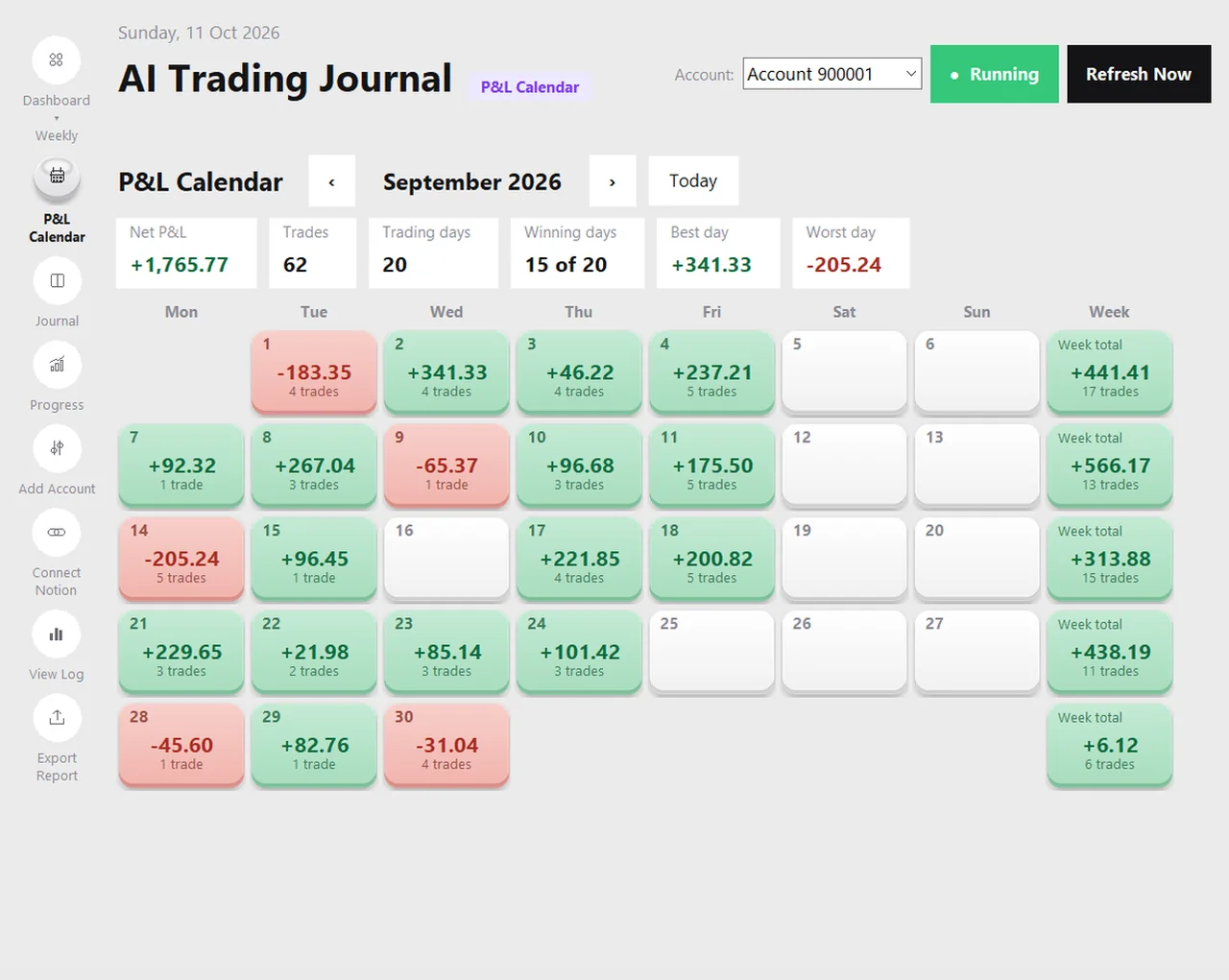
What you add is small: a plan-followed answer on each trade, and a setup, emotion or note on the ones that matter. The tagging guide shows a system that takes seconds.
Different markets, same journal
| Market | What to add to the record | Guide |
|---|---|---|
| Forex | Session, pip or money result, the pair | Forex journal |
| Gold (XAUUSD) | Spread and slippage at news, dollar per lot | Gold journal |
| Indices | Points and contract value, the cash open | Indices journal |
| Crypto CFDs | Weekend trades, higher swap | Crypto CFD journal |
Honest limits
- It is for MetaTrader 5 only. Stocks, futures and options on other platforms are not supported, and neither are MT4 or cTrader.
- It records closed positions, so a trade appears when it closes.
- It does not know the price you intended, so note large slippage yourself.
- MetaTrader 5 must be open and logged in for the app to read it.
- This page is general education, not trading advice.
Frequently asked questions
What should a day trading journal include?
How do I journal many trades a day?
Does it work for gold, indices and forex?
Can I use it for stocks or futures?
How long does a daily review take?
Related guides
- A local trading journal for MT5
- P&L calendar for MT5
- Trade notes, ratings and screenshots
- Trading progress and goals
- Back up your journal and move it to a new PC
- An offline trading journal for Windows
- How to set monthly trading goals
- Import your whole MT5 history
- How to tag trades
- Trade screenshots for your journal
- All trading journal comparisons
Journal your day trades free for 7 days
Free for 7 days, no card required. After that, a one-time $19.99 purchase. No subscription. Also on the Microsoft Store.
One-time $19.99, no monthly fee · your MT5 login never leaves your PC · trades go into your own journal on your PC, not through our servers.
Start free 7-day trial