
A scalping trading journal for MT5: track the costs, the count and the hours
Scalpers take dozens of trades a day, so the journal has to record itself. What to track, five numbers to watch and a short review routine that fits a busy day.
Scalping changes what a journal has to do
A swing trader takes a handful of trades a week and can write a paragraph about each. A scalper takes dozens in a day, holds them for minutes, and has two problems a slower trader barely notices. The first is that the costs of each trade, spread, commission and slippage, are a large part of the target, so a strategy that looks profitable before costs can lose money after them. The second is volume: nobody can hand-write forty trade notes, so a journal that depends on typing is abandoned in a week.
This page is about the fields and the metrics that matter for a scalper on MetaTrader 5, including gold and index scalpers, and how to keep the record without typing the trades.
What to record for every scalp
| Field | Why a scalper needs it |
|---|---|
| Open and close time | To measure how long you hold and to find the hours you trade best. MT5 stamps both on the broker’s server clock |
| Symbol, direction, lots | To see which instrument and side pay, and whether size crept up after a loss |
| Entry, exit, stop, target | To check that the exit matched the plan and that the stop was the one you set |
| Net result | Profit plus commission plus swap. For a scalper the commission is part of the trade, not a footnote |
| Setup | A short, consistent name so you can compare setups over hundreds of trades |
| Plan followed | A yes or no. The single most useful field in a high-frequency journal |
| Slippage, if you can see it | The gap between the price you meant and the price you got. Note it in the trade’s notes when it was large |
You do not need all of these on every trade. The first six come from MetaTrader 5 itself, and the next two are two clicks on the Journal page of AI Trading Journal. The rest is for the trades you want to study.
The five numbers a scalper should watch
- Net result per trade, after costs. Not gross. If you scalp, the difference is the whole story. The breakeven win rate calculator shows how much a cost of a few dollars raises the win rate you need.
- Trades per day. Count the trades on each day and look at how that count moves with the result. Many scalpers find their worst days are their busiest days. The overtrading guide shows how to put a cap on it.
- Average hold time. A scalp that was meant to last five minutes and ran for an hour is a different trade with a different risk. The open and close times let you calculate it.
- Results by hour. Scalping is sensitive to liquidity, so a few hours usually carry the results. See how to find your best trading hours.
- The size of your largest loss against your average loss. A scalper who keeps stops tight loses small. A stop that was moved, or a scalp that was held to hope, shows up as one large loss that wipes out a day of small wins.
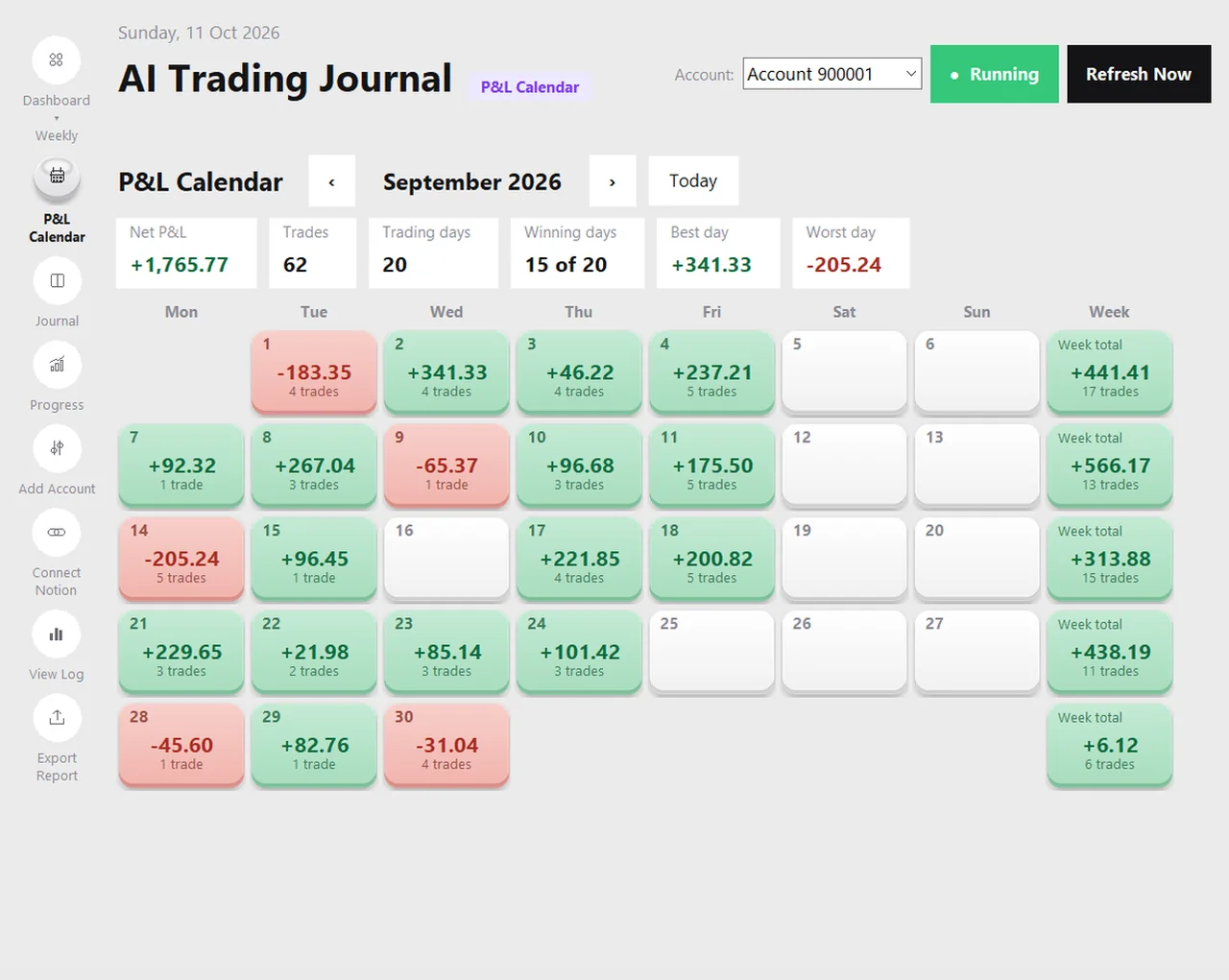
A day of scalping, read as a calendar tile (hypothetical)
| Day | Trades | Net result | What to look at |
|---|---|---|---|
| Monday | 18 | +$64 | Normal count, small positive. The baseline. |
| Tuesday | 47 | -$112 | Trade count more than doubled. What happened after the first loss? |
| Wednesday | 12 | +$41 | Back to normal. Fewer trades, a positive day. |
| Thursday | 21 | +$78 | Check the hours. Were they all in one session? |
| Friday | 9 | -$18 | Few trades, small loss. Late week fatigue, or a quiet market? |
The numbers are invented. The pattern they illustrate is common to scalpers: the day with the most trades is rarely the best. The P&L calendar prints the number of trades on every tile, so this comparison is one glance, not a calculation.
How to keep the record without typing it
AI Trading Journal reads your closed positions from MetaTrader 5 about every five minutes and saves each one in a journal on your PC, with the net result after commission and swap, the prices, the stop and take profit and the open and close times. A position closed in several parts is one entry, dated by its last exit, on the broker’s server clock. For a scalper that means a day of fifty trades appears without a single keystroke, and the calendar, the dashboard and the Excel report are all built from it.
What you add is small: a setup, an emotion and a plan-followed answer for the trades that matter, and a note on the ones that surprised you. The tagging guide shows a small system that takes thirty seconds per trade, and a rating of one to five for execution lets you filter your worst-executed scalps in a second.
A short review routine for scalpers
- After each session (two minutes): look at the day’s trade count and net result. Rate the three worst-executed trades and note what went wrong.
- Each week (fifteen minutes): open the calendar, find the busiest and the quietest days and compare them. Read the notes on the five largest losses.
- Each month (thirty minutes): export the Excel report. Look at net result by hour and by weekday, and at the trades marked as plan broken. Choose one change and test it for the next month.
Honest limits
- The journal records the prices of the trades as they were filled. It does not know the price you intended, so slippage is something you note yourself.
- It reads closed positions, so a trade shows up when it closes, not while it is open.
- MetaTrader 5 must be open and logged in for the app to read it, and the app is for MetaTrader 5 only.
- Nothing here is a trading signal or a claim about what scalping earns.
If you scalp gold, the XAUUSD journal guide adds the gold-specific points, and the position size calculator handles the lot size for tight stops.
Frequently asked questions
What should a scalper record in a trading journal?
How do I journal dozens of trades a day?
Why do costs matter more for scalpers?
Does AI Trading Journal work for gold and index scalping?
Can it record slippage?
Related guides
- A local trading journal for MT5
- P&L calendar for MT5
- Trade notes, ratings and screenshots
- Trading progress and goals
- Back up your journal and move it to a new PC
- An offline trading journal for Windows
- How to set monthly trading goals
- Import your whole MT5 history
- How to tag trades
- Trade screenshots for your journal
- All trading journal comparisons
Journal every scalp automatically: free for 7 days
Free for 7 days, no card required. After that, a one-time $19.99 purchase. No subscription. Also on the Microsoft Store.
One-time $19.99, no monthly fee · your MT5 login never leaves your PC · trades go into your own journal on your PC, not through our servers.
Start free 7-day trial