
MT5 report analyzer: how to analyse your MetaTrader 5 trade history
The built-in MT5 report gives totals, not answers. Ten questions your analysis should answer, a spreadsheet method and the tools that can do it for you.
What an MT5 report gives you, and what it does not
MetaTrader 5 can save your account history as a report: a file with your closed trades and a block of summary figures. It is a useful record and a poor analysis tool. It shows totals, such as net profit, number of trades, largest winner and largest loser, but it will not tell you which weekday you lose on, which hours are your best, which setup pays, or whether your results come from a few big trades. To answer those questions you have to take the trades out of the report and analyse them yourself.
This guide shows what to look for, how to analyse a report in a spreadsheet, what dedicated analyzers exist and where an automatic journal fits.
Ten questions a report analysis should answer
| Question | What you need | Why it matters |
|---|---|---|
| Am I profitable after costs? | Net result per trade including commission and swap | Gross numbers flatter you |
| What is my win rate and payoff? | Average win and average loss | They decide the win rate you need. See the breakeven win rate calculator |
| What is my profit factor? | Gross profit divided by gross loss | A quick strength check. See the profit factor calculator |
| Which instruments pay? | Result by symbol | Concentrate on what works |
| Which weekdays and hours pay? | Result by day and hour, on one clock | See your best trading hours |
| Do I win more long or short? | Result by direction | A bias worth knowing |
| How big is my largest loss against my average? | Largest loss and average loss | One oversized loss can erase weeks |
| How deep was my drawdown? | Running balance of closed trades | See how to track drawdown in MT5 |
| Is the result stable? | Results by month | A single month can carry a year |
| Did I follow my plan? | Your own notes | A report cannot answer this. Only a journal can |
Analysing a report in a spreadsheet
- Save the report. In the Toolbox, open the History tab, choose the period, right-click and save the report in the format offered. The export guide walks through it.
- Get the trades into one table. One row per closed position, with open and close time, symbol, direction, size and net result.
- Add helper columns: the weekday, the hour, and a win flag (1 for a profit). Use the broker’s clock throughout. See MT5 server time.
- Build a pivot table. Rows are the symbol, the weekday or the hour. Values are the count and the sum of the result.
- Compute the headline figures: win rate, average win, average loss, profit factor and expectancy. The average win and loss calculator does the arithmetic for a list of trades.
- Check the sample. A cell with a handful of trades is a hint, not a result.
Ready-made analyzers
There are also tools built to analyse an MT5 account for you. The MQL5 Market lists several analyzers, indicators and utilities that read your history inside the terminal and show statistics, drawdown and calendars. I have only read their listings, so I cannot vouch for any of them. If you try one, read the reviews, test it on a demo account first and check what it asks permission for.
| Approach | Strength | Catch |
|---|---|---|
| The built-in report | Free, always available | Totals only, no breakdowns, no notes |
| A spreadsheet you build | Total control | Time to build, and you must refresh it for every period |
| An analyzer from the MQL5 Market | Runs inside the terminal | Quality varies, and it lives in the terminal only |
| An app that reads your history (AI Trading Journal) | Charts and an Excel report without building anything; your notes sit on the same trades | Windows and MT5 only; the app is paid after a 7-day trial |
Where AI Trading Journal fits
AI Trading Journal reads your closed MetaTrader 5 positions into a journal on your own PC, including your whole account history on the first run. From it you can open the dashboard (Daily, Weekly, Monthly or All time), the P&L calendar and the Progress page, or click Export Report for an Excel workbook for any period. The Summary sheet has charts of cumulative and daily P&L, net P&L by weekday, hour and symbol and winning against losing trades, built from live formulas, and the Trades sheet carries every position with your notes. That answers most of the ten questions above without a pivot table.
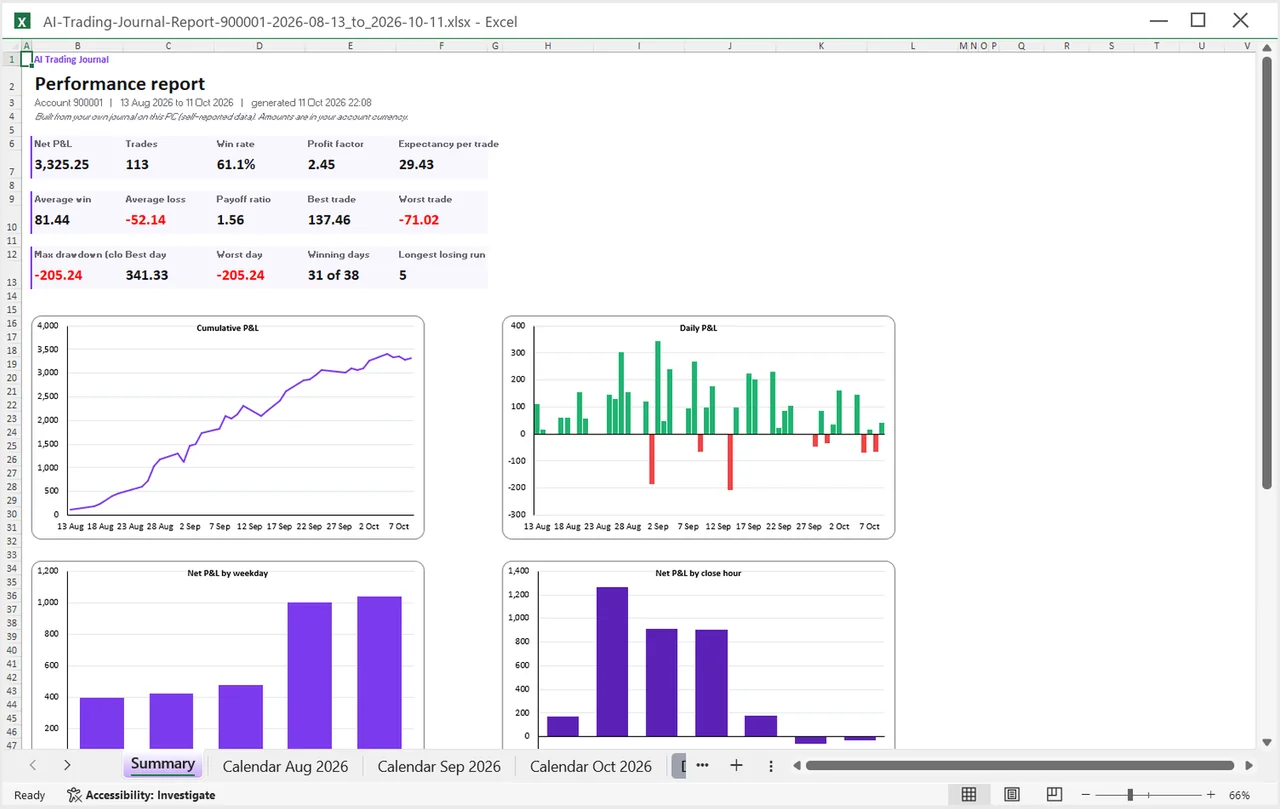
It does not replace judgment. It is a record of your own trades, not an audited statement, so compare a few figures with your broker before relying on them. See the Excel report guide for every sheet.
Common mistakes when analysing a report
- Mixing clocks. Server time in one column and local time in another moves trades between days and hours.
- Ignoring deposits. Balance operations are not trades and must not count as wins.
- Counting each fill as a trade. A position closed in parts is one trade.
- Reading a short period. Twenty trades are not a verdict.
- Skipping the why. Numbers show where; only your notes show why.
A note for Mac users
AI Trading Journal is a Windows desktop app, so it does not run natively on a Mac. If you run MetaTrader 5 on a Mac, you can still export the history from the terminal as a report and analyse it in a spreadsheet using the steps on this page. The app itself needs Windows, and it reads the history from a MetaTrader 5 terminal installed on that same PC. The export guide shows the file formats available.
Using a Mac? MT5 trading journal for Mac covers exporting and the options available.
Frequently asked questions
Does MT5 have a built-in report analyzer?
How do I analyse my MT5 trade history in Excel?
What should I look at first in a trade report?
Does AI Trading Journal analyse my MT5 report?
Are MQL5 Market analyzers safe?
Related guides
- A local trading journal for MT5
- P&L calendar for MT5
- Trade notes, ratings and screenshots
- Trading progress and goals
- Back up your journal and move it to a new PC
- An offline trading journal for Windows
- How to set monthly trading goals
- Import your whole MT5 history
- How to tag trades
- Trade screenshots for your journal
- All trading journal comparisons
Skip the spreadsheet work: try it free for 7 days
Free for 7 days, no card required. After that, a one-time $19.99 purchase. No subscription. Also on the Microsoft Store.
One-time $19.99, no monthly fee · your MT5 login never leaves your PC · trades go into your own journal on your PC, not through our servers.
Start free 7-day trial